Cx Issues
Spot a problem on site — log it in 10 seconds with priority, discipline, and equipment tags.
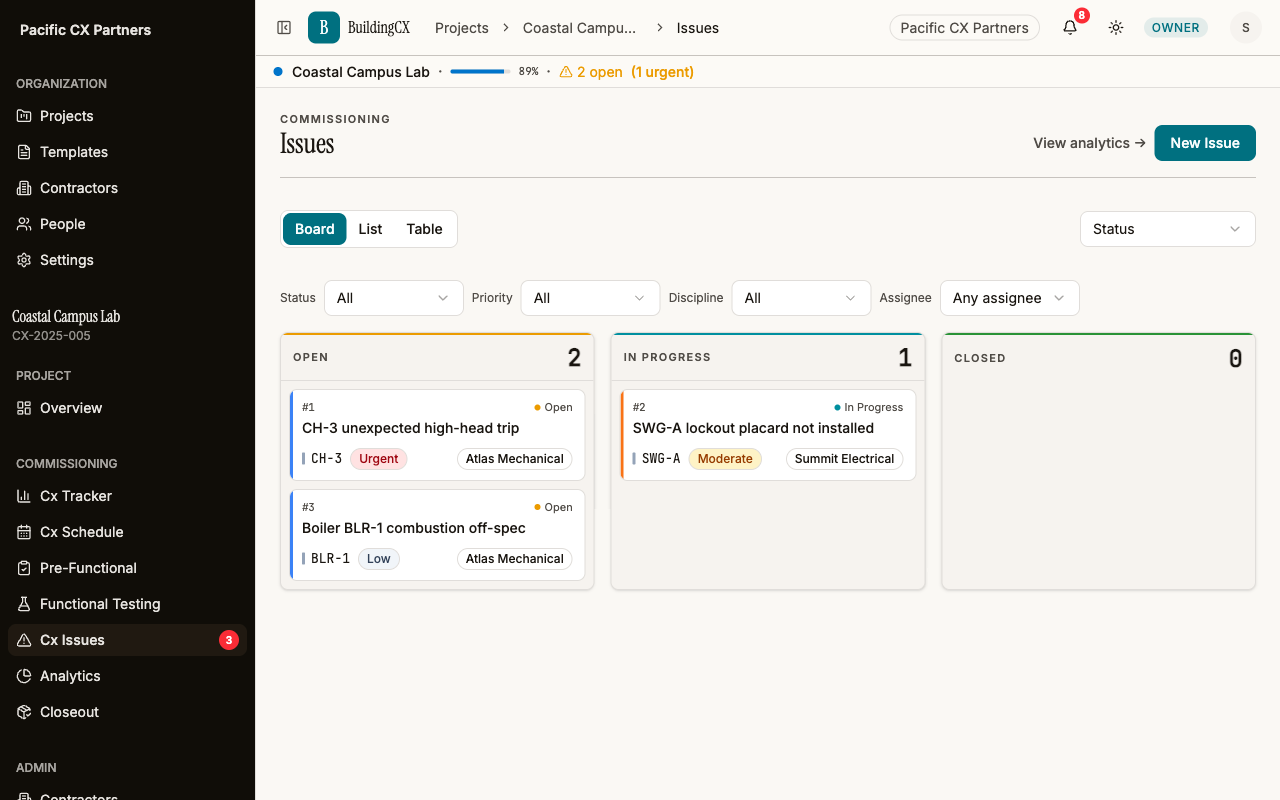
Field issues don't wait for you to get back to the office. BuildingCX lets you log commissioning issues on the spot with structured fields — priority, discipline, equipment tag, and rich text description. View issues on a Kanban board grouped by status, priority, discipline, or assignee. Comment threads and photo attachments keep all context in one place.
Log it fast, track it visually
Structured fields keep entry to seconds; the Kanban board keeps the whole team looking at the same list.
Log in 10 seconds
Priority, discipline, and equipment dropdowns — never freetext. Structured data from the start.
Kanban board
Visual board view with cards across Open, In Progress, and Closed columns. Drag to update status.
Multiple views
Group by status, priority, discipline, or assignee. Switch views to see issues from different angles.
Rich text descriptions
Full rich text editor with @mentions for detailed issue descriptions. Not just a text field.
Comment threads
Threaded comments per issue with @mentions. Keep the conversation attached to the issue, not in email.
Photo attachments
Attach photos directly from the field. Visual evidence of the problem alongside the description.
Works with the rest of the platform
Ready to try it?
Start your first project free. No credit card required.
Get started free