Cx Tracker
A project dashboard that populates itself — no spreadsheets, no status meetings.
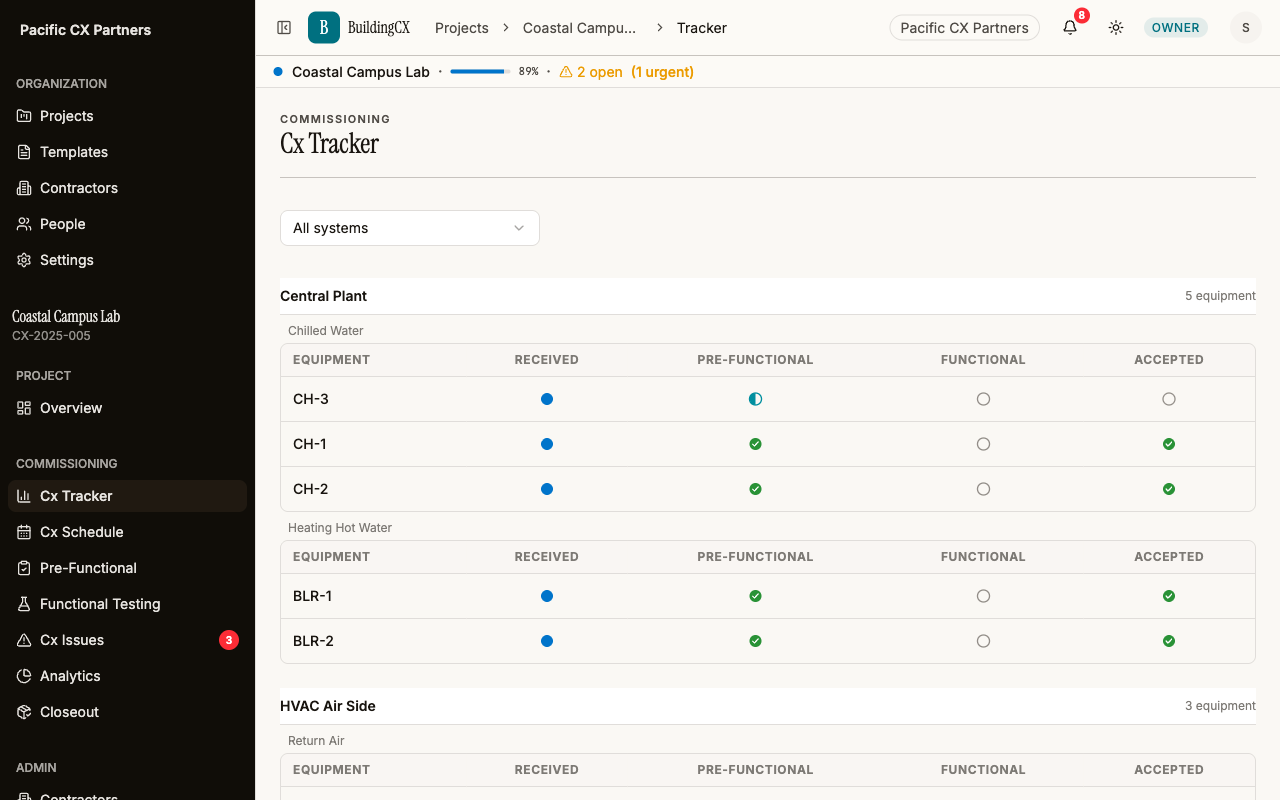
The Cx Tracker gives you a live, auto-updating view of every piece of equipment on your project. As contractors complete checklist items, the tracker updates in real time. Filter by system, trade, or status to see exactly where things stand — without asking anyone for a status update.
One dashboard, every angle
Filter by trade, system, or project — the tracker updates itself, so every view is live.
Auto-updating progress
Every time a contractor checks an item or signs a form, the tracker updates. No manual data entry.
Per-trade breakdown
See completion percentage by trade — mechanical, electrical, controls — not just overall.
System filtering
Filter by mechanical, electrical, plumbing, or any custom system to focus on what matters.
Equipment drill-down
Click any equipment tag to see all linked checklists, functional tests, and open issues.
Project overview
Dashboard stat cards show total equipment, open issues, and overall completion at a glance.
Multi-project view
The projects list shows progress across all active projects. Pin your most important ones.
Works with the rest of the platform
Ready to try it?
Start your first project free. No credit card required.
Get started free